Portrait or Landscape
Choosing the Best Photo Format for Your Memories and Narrin Studio
PHOTO ORGANIZATION & PRESERVATION
Manfred Maiers
5/31/20263 min read
Portrait or Landscape?
Choosing the Best Photo Format for Your Memories and Narrin Studio
One of the most common questions people ask when taking photos is:
Should I take this picture in portrait or landscape mode?
For decades, the answer didn't matter very much.
Printed photos could easily be:
placed into albums.
framed on walls.
arranged into photo collages.
displayed on shelves.
A mix of portrait and landscape photos worked perfectly.
But the world has changed.
Today, most memories are viewed digitally on:
smartphones.
tablets.
digital picture frames.
smart displays.
televisions.
And that changes the conversation completely.
Understanding Portrait and Landscape
Before we discuss recommendations, let's define the two orientations.
Portrait Orientation
Portrait photos are taller than they are wide.
Examples:
3:4
9:16
Portrait orientation is commonly used for:
people.
family photos.
group photos.
social media.
mobile phone viewing.
Landscape Orientation
Landscape photos are wider than they are tall.
Examples:
4:3
16:9
Landscape orientation is commonly used for:
scenery.
mountains.
beaches.
city skylines.
panoramic views.
Why Landscape Worked Well in the Past
When photos were printed, orientation was rarely a concern.
A photo album could easily hold:
portrait photos.
landscape photos.
square photos.
The same was true for:
wall frames.
scrapbooks.
photo collages.
Each photo occupied its own physical space.
No compromises were required.
Why Digital Displays Change Everything
Digital displays introduce a new challenge.
Most people today view memories on:
phones.
tablets.
digital picture frames.
Phones can be rotated.
If you want to view a landscape image, simply turn the phone sideways.
No problem.
Digital picture frames are different.
Many frames:
hang permanently on a wall.
sit on a fixed display stand.
remain in a single orientation.
Switching orientation every time a photo changes simply isn't practical.
What Happens When Orientation Doesn't Match?
Imagine a portrait digital frame displaying a landscape photo.
The image must shrink to fit the available space.
The result is often:
large empty borders.
unused screen space.
smaller image presentation.
The same issue occurs when portrait photos are displayed on landscape-oriented screens.
Much of the display area remains unused.
How Narrin Studio Handles This
Narrin Studio can generate slideshows in:
portrait mode.
landscape mode.
Narrin can even automatically select layouts based on the original photo orientation.
However, physics still wins.
A landscape photo displayed inside a portrait layout will always leave unused screen space.
The opposite is equally true.
No software can completely eliminate that limitation.
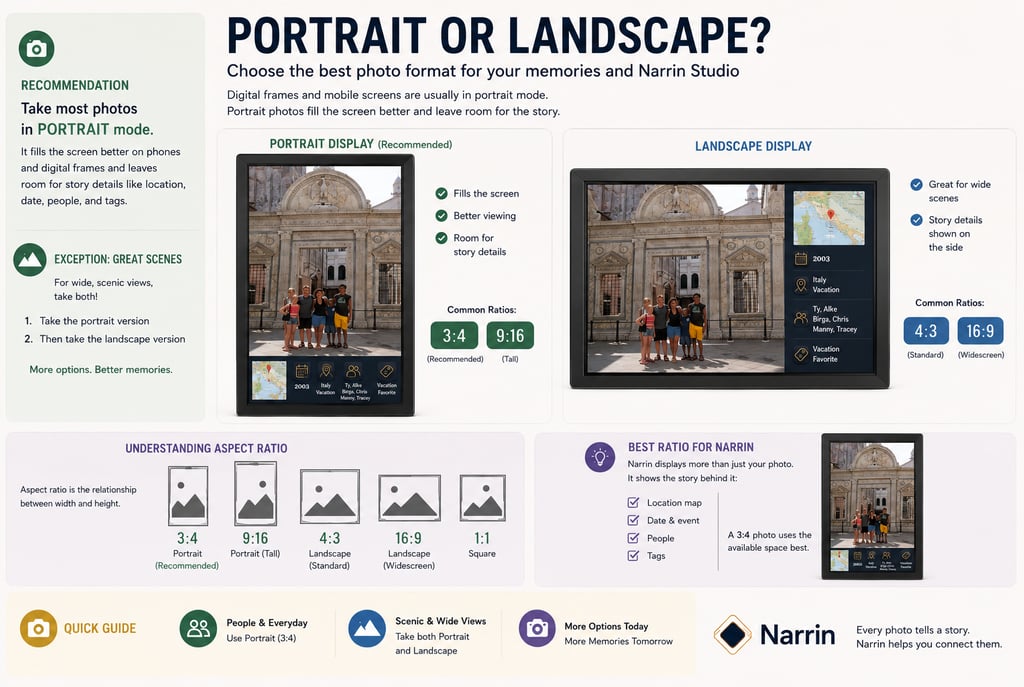
My Recommendation: Default to Portrait
After reviewing thousands of travel and family photos over the years, my recommendation is simple:
Take most photos in portrait orientation.
Why?
Because portrait photos work exceptionally well on:
phones.
tablets.
digital picture frames.
social media platforms.
Narrin View portrait storytelling displays.
Portrait images maximize the available screen area on most modern devices.
The Exception: Scenic Landscapes
There is one important exception.
Some scenes deserve a landscape photo.
Examples:
mountain ranges.
ocean views.
city skylines.
sunsets.
wide group shots.
For these situations my recommendation is:
Take two photos.
Take the portrait version first.
Then take a landscape version.
This approach provides maximum flexibility later.
You get:
the best version for digital storytelling.
the best version for scenic presentation.
Storage is cheap.
Missing the perfect shot is expensive.
Understanding Aspect Ratio
Orientation is only part of the story.
The second factor is aspect ratio.
Aspect ratio describes the relationship between width and height.
For example:
3:4
The image is 3 units wide and 4 units tall.
This is a portrait-oriented format.
4:3
The image is 4 units wide and 3 units tall.
This is a landscape-oriented format.
9:16
A taller portrait format commonly used by:
smartphones.
Instagram Reels.
TikTok.
YouTube Shorts.
16:9
A wide-screen format commonly used by:
televisions.
computer monitors.
video content.
Which Aspect Ratio Is Best for Narrin?
For Narrin Studio and Narrin View, the ideal photo format is:
3:4 Portrait
Why?
Narrin storytelling layouts include more than just the photo.
The display may also contain:
location maps.
dates.
events.
people.
tags.
story metadata.
Part of the screen is intentionally reserved for storytelling information.
The remaining photo area works exceptionally well with a 3:4 portrait image.
This allows:
larger photo presentation.
better balance.
more storytelling context.
improved visual design.
A Good Rule to Follow
If your phone allows multiple photo formats, consider using:
Primary Format
3:4 Portrait
For:
travel.
family photos.
daily life.
special events.
Secondary Format
4:3 Landscape
For:
scenic views.
architecture.
wide compositions.
The Future of Memory Storytelling
As digital storytelling becomes more common, how we capture photos today affects how we experience them tomorrow.
A simple change in orientation can dramatically improve the viewing experience on:
digital frames.
tablets.
smart displays.
Narrin View.
My personal recommendation is straightforward:
Take portrait photos by default.
And when you encounter an unforgettable landscape:
Take both.
You'll thank yourself years later when those memories become part of your story.
Because every photo tells a story.
Narrin helps you connect them.