

Digital Photo Organization Guide
Preparing Your Memories for Narrin Studio
PHOTO ORGANIZATION & PRESERVATION
Manfred Maiers
5/29/20263 min read
Digital Photo Organization Guide
Preparing Your Memories for Narrin Studio
One of the most common questions we receive is:
"How should I organize my photos before importing them into Narrin Studio?"
The good news is that you do not need a complicated system.
In fact, the simpler your photo organization strategy, the easier it will be to build meaningful stories later.
This guide explains some best practices for storing and organizing your digital memories in a way that works well today and will make importing into Narrin Studio simple and efficient.
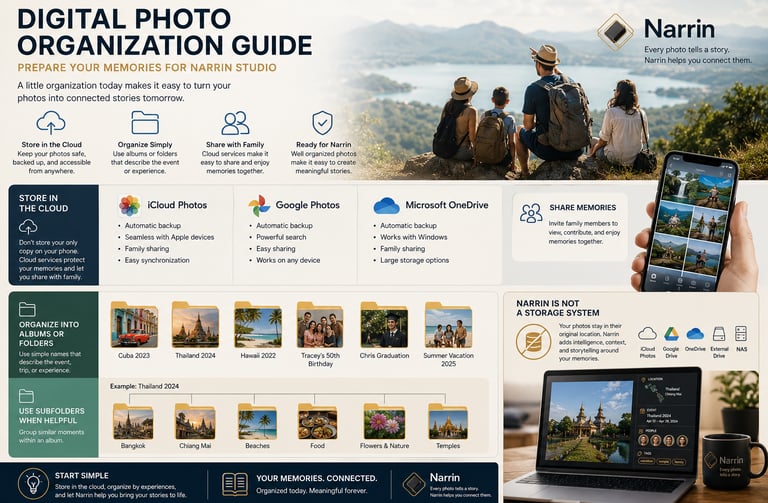
Start with Cloud Storage
The most important recommendation is:
Do not store your only copy of photos on your phone.
Phones are convenient for taking pictures, but they are not ideal as the primary location for long-term photo storage.
Phones can:
be lost.
be stolen.
become damaged.
run out of storage.
be replaced.
Instead, your photo library should be stored in a cloud-based system that automatically backs up your memories.
Recommended platforms include:
Apple iCloud Photos
Ideal for Apple users.
Benefits:
automatic backup.
seamless integration with iPhone, iPad, and Mac.
family sharing options.
easy photo synchronization.
Google Photos / Google Drive
Works well across both Android and Apple devices.
Benefits:
automatic backup.
powerful search capabilities.
easy sharing.
cross-platform access.
Microsoft OneDrive
A great option for Windows - and it is available on Apple and Android devices.
Benefits:
automatic backup.
integration with Windows.
family sharing features.
large storage plans.
Share Memories with Family
One advantage of cloud storage is the ability to share access with other family members.
Many families have photos spread across:
multiple phones.
multiple computers.
different cloud accounts.
Shared family libraries can help keep memories together and make them easier to access in the future.
As Narrin evolves, having your photos available through a centralized cloud service will make building connected stories much easier.
Organize Photos into Meaningful Albums
Once your photos are safely stored, the next step is organization.
The goal is not perfection.
The goal is creating simple groupings that make sense to you.
A good rule is:
Organize photos around events, trips, and life experiences.
Examples:
Cuba 2023
Thailand 2024
Hawaii 2022
Tracey's 50th Birthday
Chris Graduation
Wedding Anniversary Cruise
Summer Vacation 2025
These names immediately provide context and make it easier to locate memories later.
I don't recommend the use of Subfolders
Sometimes a trip or event contains many different categories of photos.
In those situations, subfolders can be useful.
You do not need deep or any subfolder structures when using Narrin.
Simple organization is usually best.
Avoid Overcomplicated Folder Systems
Many people create folder structures that become difficult to maintain.
Examples:
Photos
Travel
International
Asia
Thailand
Bangkok
Day 1
Day 2
Day 3
While this may seem organized initially, it often becomes difficult to manage over time.
Instead, keep things simple:
Thailand 2024
This approach is easier to maintain and easier to understand years later.
Why This Matters for Narrin Studio
Narrin Studio is designed to enrich your photos with additional meaning.
When photos are already grouped by experiences and events, Narrin can help connect them to:
people.
places.
events.
maps.
timelines.
tags.
stories.
For example:
A folder called Hawaii 2022 can quickly become:
Location:
Oahu, Hawaii
Event:
Family Vacation 2022
People:
Manny, Tracey, Chris, Rachel, Ty, Chelsi
Tags:
vacation, beach, family, favorite
Story:
A connected timeline of your Hawaiian adventure.
The better your photos are grouped initially, the easier it becomes to create rich storytelling experiences.
Narrin Is Not a Storage System
One important thing to understand:
Narrin Studio does not store your original photos.
Your files remain exactly where they are today:
Apple iCloud.
Google Drive.
Google Photos.
Microsoft OneDrive.
Local storage.
External drives.
NAS systems.
Narrin simply adds intelligence, structure, context, and storytelling around those files.
This approach provides several advantages:
no duplicate photo libraries.
no need to move files.
continued use of your preferred storage provider.
protection of your existing organization system.
Narrin focuses on connecting memories, not replacing storage.
Start Simple
You do not need a perfect organization system before using Narrin.
The best approach is:
Store photos in a cloud-based service.
Organize them into meaningful albums or folders.
Use simple names based on events and experiences.
Add subfolders only when helpful.
Let Narrin connect the rest.
Your memories already contain amazing stories.
A little organization today can make them much easier to rediscover tomorrow.
Because every photo tells a story.
Narrin helps you connect them.