

Tablets vs. Digital Photo Frames
Which Is Better for Displaying Your Memories?
PHOTO ORGANIZATION & PRESERVATION
Manfred Maiers
7/23/20269 min read
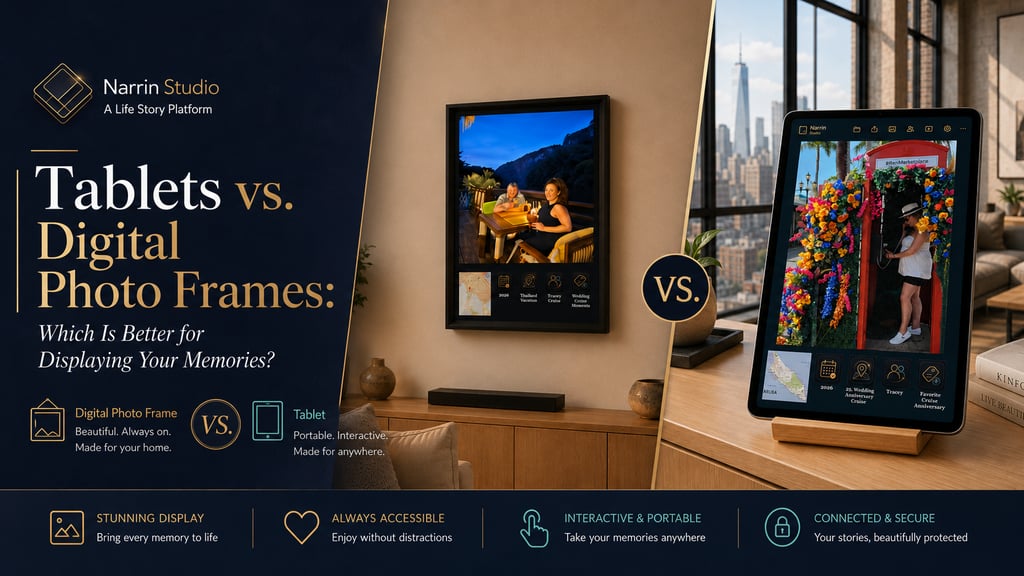
Tablets vs. Digital Photo Frames
Which Is Better for Displaying Your Memories?
How Narrin Studio and Narrin View transform photos, videos, places, people, events, and experiences into connected life stories
Digital photo frames and tablets do not need to compete. With Narrin, they can become different parts of the same Life Story Platform
One Goal, Two Very Different Devices
Should you display your memories on a dedicated digital photo frame or repurpose a tablet?
Both can show photos and videos. Both can connect to Wi-Fi. Both can sit on a sideboard, desk, shelf, or wall.
But they are designed for very different purposes.
A digital photo frame is primarily a dedicated display. Once it is configured, it quietly cycles through your photos throughout the day.
A tablet is a portable computer. It can display memories, but it can also browse the internet, run applications, play games, manage email, stream entertainment, and support interactive experiences.
The right choice depends on what you want to do.
Do you want an affordable, stationary display that continuously presents your memories? A digital photo frame may be ideal.
Do you want to touch, search, filter, explore maps, play videos, and interact with your memory collection? A tablet offers more possibilities.
With Narrin, these two options do not need to compete. They can become different parts of the same Life Story Platform.
What Is a Digital Photo Frame?
A digital photo frame is an electronic screen designed primarily for displaying photos and, on many models, short videos.
Unlike a traditional printed frame, one digital frame can rotate through hundreds or thousands of images. Most models include slideshow software, so the user does not need to install another application simply to display photos.
Depending on the model, a frame may support:
automatic slideshows
portrait and landscape orientation
photo and video playback
internal storage
memory cards or USB drives
remote sharing through a mobile application
cloud-connected albums
motion sensors
touchscreen controls
desk stands and wall mounts
Most digital frames are designed to remain stationary. They normally require continuous power from a wall outlet, even when the manufacturer includes limited internal backup power.
That stationary design is not necessarily a weakness. It makes the frame dependable.
A tablet may be carried to another room, borrowed by a family member, or used for another purpose. A digital frame remains where it belongs, displaying memories every day.
Digital Photo Frame Sizes
Digital photo frames are available in a much broader range of display sizes than many people realize.
Compact frames
Common sizes include:
7 inches
8 inches
10 inches
These work well on:
office desks
nightstands
kitchen counters
bookshelves
reception desk
Current official product listings show that basic Wi-Fi frames in this size range can begin at approximately $50, while many 10-inch Wi-Fi touchscreen models fall closer to $70 to $100. Prices vary by display quality, storage, brand, and promotions.
Medium home displays
Common sizes include:
10 inches
13 inches
15 inches
These are well suited for:
sideboards
fireplace mantels
living-room shelves
family rooms
entryways
Representative current listings include 13.3-inch Wi-Fi frames around $120 and 15-inch to 15.6-inch Wi-Fi models around $120 to $170.
Large displays
Larger digital frames are available in:
17 inches
18.5 inches
21.5 inches
24 inches and larger
These can work in:
hallways
large family rooms
vacation homes
offices
senior living facilities
hotels
museums
corporate lobbies
The price advantage becomes more nuanced at this size. A current 17-inch Wi-Fi touchscreen frame is listed at approximately $200, while a 21.5-inch smart Wi-Fi model is listed at approximately $250. That remains considerably less than many premium large-screen tablets, but buyers should not assume every 21-inch Wi-Fi frame costs less than $200.
Resolution Matters
Screen size is only one part of the buying decision.
A large low-resolution screen may look less impressive than a smaller Full HD display. Buyers should consider:
resolution
brightness
viewing angle
color accuracy
contrast
aspect ratio
automatic rotation
portrait support
viewing distance
These qualities are particularly important when displaying Narrin's patent-pending multi-panel images.
A Narrin slide can include:
the original photograph
a location map
a map pin
the date
the event
the people
meaningful tags
The details need to remain readable from a normal viewing distance. Full HD or higher is therefore especially valuable on medium and large displays.
Why Wi-Fi Is Essential
A non-connected frame can still display photographs from a memory card, USB drive, or local storage. However, Wi-Fi dramatically improves the experience.
A Wi-Fi frame may allow you to:
add photos remotely
synchronize shared albums
send new memories to relatives
update a grandparent's frame from another city
refresh a slideshow without touching the device
share vacation photos while the trip is still happening
The exact method varies by manufacturer. Some frames use a companion mobile application. Others support cloud albums, email uploads, or shared accounts.
The important distinction is that the frame normally plays its slideshow without a separate application being opened each day. A mobile app may be needed to manage or transfer content, but the frame itself remains a dedicated display.
Why Multiple Frames Can Make Sense
Because digital photo frames can be relatively affordable, families do not need to place their entire photo library on one device.
Each room can tell a different story.
In the kitchen: Cooking Around the World
Tracey and Manny enjoy taking cooking classes when they visit other countries.
A dedicated kitchen frame could display:
a mojito class in Cuba
a cooking lesson in Thailand
Italian food experiences
local markets
favorite meals
street-food adventures
The collection would connect experiences from different countries through one meaningful theme: Cooking Together.
In the bedroom: Cheers Moments
Another frame could show every time Tracey and Manny raised a glass together:
Santorini sunsets
Caribbean cruises
anniversary dinners
Thailand adventures
local celebrations
quiet evenings at home
These images may have different dates, locations, and events, but Narrin can connect them through the tag Cheers Moment.
In the living room: Family Adventures
This collection might include:
major vacations
family reunions
graduations
cruises
national parks
milestone birthdays
In the office: Travel Inspiration
A frame could rotate through:
favorite destinations
location maps
bucket-list experiences
landscapes
future travel ideas
A special frame for Sasha
A dedicated pet collection could preserve:
neighborhood walks
park visits
holiday moments
family gatherings
everyday companionship
Instead of one random slideshow, each frame becomes a curated chapter of a life story.
What Is a Tablet?
A tablet is a general-purpose touchscreen computer with:
an internal rechargeable battery
Wi-Fi
applications
speakers
touch interaction
video playback
cameras
web access
cloud connectivity
A tablet can certainly operate as a digital picture display. However, it may require additional configuration, such as:
selecting a built-in gallery slideshow
installing a third-party slideshow application
disabling notifications
preventing the screen from sleeping
configuring guided or kiosk mode
placing it on a stand
keeping it connected to a charger
A tablet offers more flexibility, but it also requires more management.
The Main Tablet Categories
Amazon Fire tablets
Amazon's Fire family includes compact 8-inch models, 10.1-inch Full HD models, and an 11-inch Fire Max model. Current product information describes battery life of up to approximately 13 hours on the Fire HD 8 and up to 14 hours on the Fire Max 11.
Fire tablets occupy the more affordable end of the tablet market and can be practical for passive or lightly interactive displays.
However, buyers should verify application compatibility. Fire tablets use Amazon's application ecosystem, and some product listings note that Google Play is not supported.
Mainstream Android tablets
Android tablets cover a wide range, from affordable family devices to premium productivity systems.
Samsung's current offerings include 11-inch tablets and large 14.6-inch Ultra models. Premium Galaxy Tab models include Wi-Fi connectivity, internal batteries, touch interaction, AMOLED displays, and long stated video-playback times, depending on the model.
Android tablets are attractive for users who want:
application flexibility
touch controls
video playback
expandable storage on selected models
kiosk-style display options
a broader entertainment device
Apple iPads
Apple offers several iPad sizes and price levels. As of July 2026, the standard iPad occupies the entry point, while larger iPad Air and iPad Pro configurations move into premium price ranges. Apple states that current iPads support Wi-Fi and provide approximately 10 hours of web browsing or video playback, depending on the model and connection.
An iPad can provide an excellent interactive display experience, but it is substantially more expensive than many dedicated frames, especially when compared with 15-inch and 17-inch photo frames.
Windows tablets and 2-in-1 computers
Windows devices, such as the Microsoft Surface Pro, combine tablet interaction with a full desktop operating system.
Current Surface Pro models can include:
13-inch touchscreens
internal batteries
Wi-Fi
adjustable kickstands
optional keyboards
pen support
desktop application compatibility
These devices can be powerful platforms for Narrin Studio or Narrin View where supported, but they occupy the premium end of the market.
Digital Photo Frame vs. Tablet
The following comparison summarizes the most important practical differences.
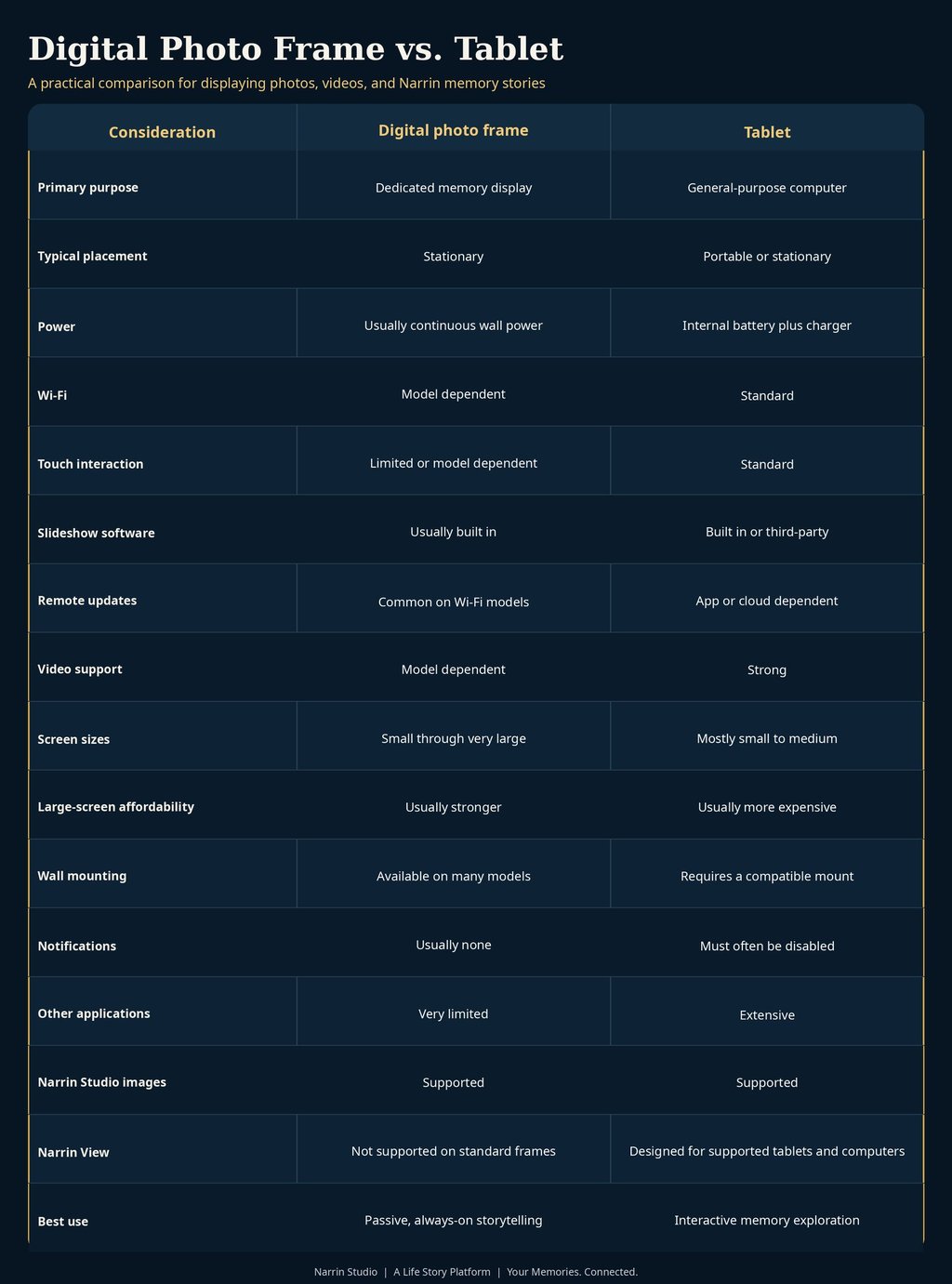
Figure 1. Digital photo frame versus tablet comparison. The table is provided as an image for blog compatibility.
Where Narrin Studio Fits
Narrin Studio supports both approaches.
It can organize memories and generate story-driven slideshows based on:
Location
Events
People
Tags
Narrin Studio can prepare portrait and landscape collections for different screens and rooms.
The content can be organized around questions people naturally ask:
Show me our memories from Costa Rica
Show me every Caribbean cruise
Show me all the memories with Tracey
Show me every Cheers Moment
Show me all our cooking classes
Show me every waterfall
Show me our memories with Sasha
This is very different from selecting a folder and pressing Play.
The Patent-Pending Multi-Panel Experience
A traditional slideshow presents one image at a time.
Narrin Studio can transform that image into a complete visual story.
For example, a photograph from Costa Rica might appear with:
Original photo
Tracey and Manny standing near a waterfall.
Location:
La Fortuna, Costa Rica, with a map and exact location pin.
Event:
Costa Rica Adventure.
People:
Tracey and Manny.
Tags:
Waterfall, Tropical Forest, Adventure, Bucket List, Together.
The photograph remains the centerpiece, but the surrounding Memory Context answers four important questions:
Where did the memory happen?
What experience did it belong to?
Who shared it?
What made it meaningful?
Narrin Studio and Digital Photo Frames
Narrin Studio can generate pre-rendered images and slideshows for standard off-the-shelf digital photo frames.
The frame does not need to run Narrin software.
It simply needs to support the exported image format, resolution, orientation, and transfer method.
This creates several advantages:
no proprietary Narrin frame is required
families can choose hardware that fits their room and budget
existing frames can continue to be used
different frames can present different collections
both portrait and landscape displays can be supported
large screens can provide affordable, passive storytelling
The digital photo frame provides the display. Narrin Studio provides the story.
Narrin Studio and Tablets
Tablets can also display slides and collections produced by Narrin Studio.
This combines Narrin's contextual storytelling with:
portable hardware
touchscreens
high-quality displays
video-capable applications
familiar Wi-Fi connectivity
flexible stands and mounts
However, displaying exported Narrin Studio slides is not the same as running Narrin View.
Introducing Narrin View
Narrin View is the interactive companion to Narrin Studio.
It is designed for supported tablets and computers, not standard commodity digital photo frames.
Narrin View can support a richer experience with capabilities such as:
dynamically generated slideshows
interactive exploration
map experiences
filters
navigation
search
The product relationship is straightforward:
Narrin Studio manages and creates the memory stories
digital photo frames display Narrin Studio's pre-rendered content
tablets can display pre-rendered Narrin Studio content or run Narrin View for a more interactive experience
Which Should You Choose?
Choose a digital photo frame when:
you want a dedicated, always-on display
you want a larger screen for less money
you prefer a simple slideshow experience
you do not need constant touch interaction
you want several themed displays throughout the home
you are buying a simple family gift
you do not want applications or notifications interrupting the experience
Choose a tablet when:
you want touch interaction
you want portability
you want video and audio
you want to search and filter memories
you want to explore maps and related content
you want to run Narrin View
you also need web, email, entertainment, or productivity applications
Choose both when:
you want affordable, passive displays throughout your home
you want one interactive device for deeper exploration
you want large frames in key rooms
you want one common Narrin memory library across every screen
The Strongest Narrin Setup
The most complete solution may be a hybrid system.
Narrin Studio
Use Narrin Studio to organize photos, add Memory Context, and build connected stories.
Wi-Fi digital photo frames
Place affordable, always-on story collections throughout the home.
Examples:
Cooking Around the World in the kitchen
Cheers Moments in the bedroom
Family Adventures in the living room
Life With Sasha in the entryway
Narrin View on a tablet
Use a supported tablet for:
interactive exploration
maps
searches
filters
dynamically generated stories
This approach combines the price advantage of dedicated frames with the interactivity of a tablet.
The Final Decision
Digital photo frames and tablets are not interchangeable, but neither is universally better.
A digital photo frame is often the better dedicated display.
A tablet is the better interactive device.
Narrin supports both.
A frame can quietly show years of cooking adventures in the kitchen.
Another can celebrate every toast Tracey and Manny have shared.
A tablet can let the family explore trips, places, events, people, tags, and videos in greater depth.
Because memories deserve more than a random slideshow.
They deserve context.
They deserve connections.
They deserve stories.
Narrin Studio • A Life Story Platform • Your Memories. Connected.
Buyer Decision Guide


Frequently Asked Questions
Can a tablet replace a digital photo frame?
Yes. A tablet can display slideshows, but it may require an application, stand, charger, notification controls, and sleep-setting adjustments. A dedicated frame is generally simpler for continuous display.
Do digital photo frames require Wi-Fi?
No, but Wi-Fi makes remote updating and family sharing much easier. Non-Wi-Fi frames normally depend on USB drives, memory cards, or direct local transfers.
Can Narrin Studio work with a standard digital photo frame?
Yes. Narrin Studio can generate pre-rendered images and slideshows for compatible off-the-shelf frames, subject to the frame's supported resolution, orientation, file formats, and transfer method.
Does Narrin View run on digital photo frames?
No. Narrin View is intended for supported tablets and computers. Standard digital photo frames display content generated by Narrin Studio.
Is a digital photo frame less expensive than a tablet?
Often, particularly at larger display sizes. Current 15-inch to 17-inch Wi-Fi frames can cost substantially less than many premium tablets. Pricing varies considerably by brand, features, and promotions.